Proxmox (GRETAP, VXLAN, GRE & Netbird)
Requirements
- basic understanding when reading this documentation
- An active, functioning IP transit tunnel from NovaCloud-Hosting
Be aware that your actions during setup can lead to your system(s) losing Internet access if something goes wrong.
Receive tunnel information
In order to successfully set up a tunnel in accordance with our documentation, it is essential to take a brief look at how to obtain all the necessary tunnel information.
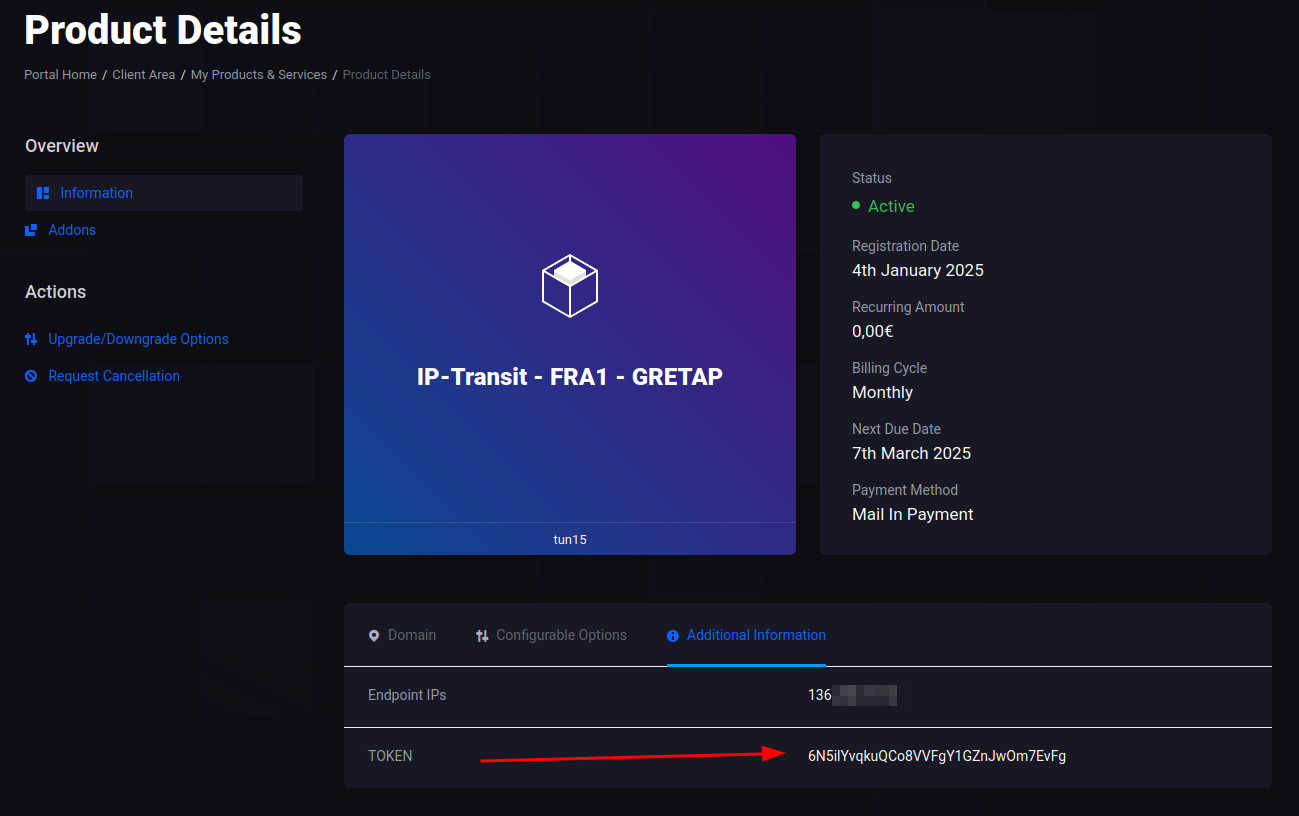
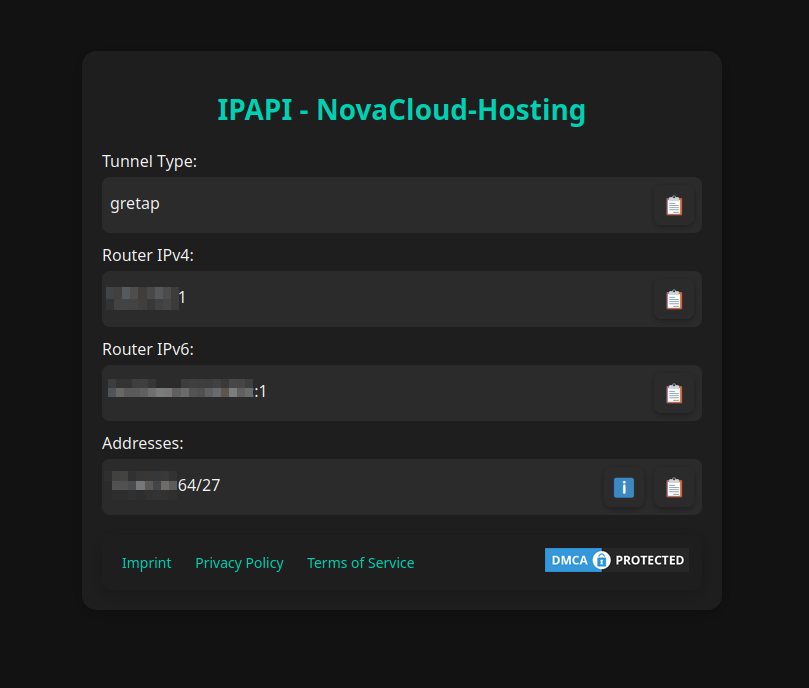
First, open the tunnel product in the client area and copy the “TOKEN” found under “Additional Information”.
As of 08.05.2026 there is rework after migration on this System. New customers will no longer receive information via IPAPI, but will instead be contacted via email or support ticket. We apologize for any inconvenience until the system upgrade is complete and IPAPI has been replaced. If you need more information, please contact support.
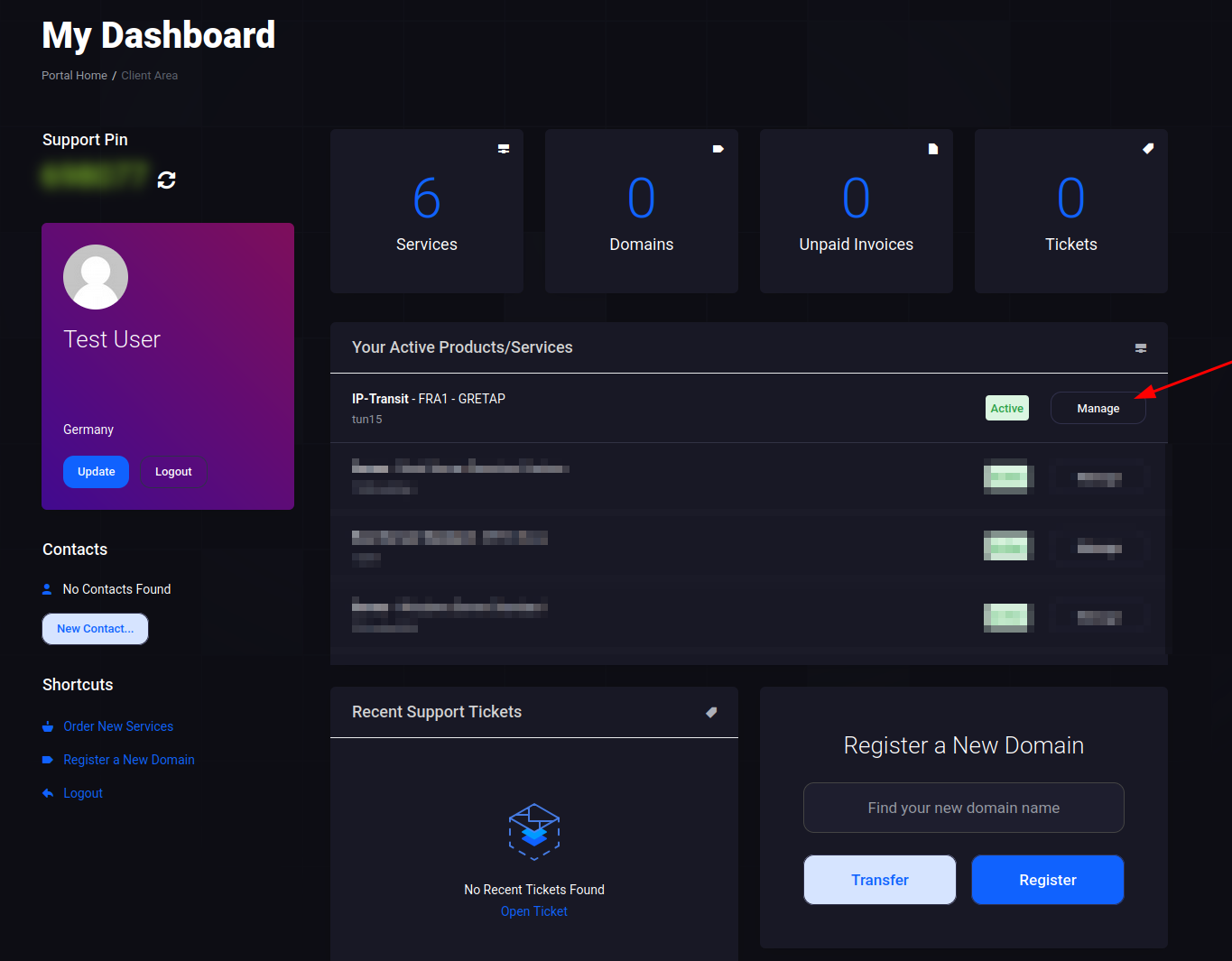
Open the page https://ipapi.novacloud-hosting.com in a non Internet Explorer 11 browser and enter the token. You will then receive all the necessary information at a glance.
Please avoid sharing this token even if it does not contain extremely sensitive information.
Tunnel configuration/set-up
In any case, the file /etc/network/interfaces must be edited and the following content of the templates must be added (after you ajusted the content).
Insert the applicable configuration template from below (in some instructions there is only one) into the configuration file.
Once you have done this, you must adjust a few things. Variables are displayed with their name in <>, you can get the corresponding information via our IPAPI. These must be replaced with the correct content in full, including <>.
Once again: you search for variables which can be recognized because they are written in <> and replace them with the data from the IPAPI. Always pay attention to comments, which can usually be recognized graphically and by # characters, these indicate if something needs special handling. You need to understand comments so that the configuration is successful. Variables in commented out sections do not have to be replaced/inserted, as commented out sections have no function/are not taken into account.
Explanation table Variables
In addition, you find a table here which describes what some and not all of these variables do/what they are for. This will help to understand some variables better and to replace them with the right data.
| Name | Description |
|---|---|
<Local Endpoint> | An endpoint IP stored in our system (usually that of your server), which you specified when ordering. This is listed in the IPAPI under “Allowed Endpoints”. |
<Useable Address> | Here you should enter a usable IP address that is assigned to your tunnel and that you want to use. You can find usable IP addresses under the IP resources in the information-button-menu about your subnets. |
<CIDR Notation> | Enter the CIDR notation of the subnet here. You can find this under the IP resources in the information-button-menu. |
<Our Router IPv4 OR Our Router IPv6> | For this hybrid variable with either IPv4 or IPv6, please note that only one of the two options should be entered, according to your preference. |
If you are at a point where you would rather have us set it up for you because it is too complicated or you have no knowledge, open a ticket and write to us. However, this is a chargeable and not a free service.
Templates by Tunneltype
VXLAN (Endpoint via IPv4)
auto tun10
iface tun10 inet manual
mtu 1450
pre-up ip link add name tun10 type vxlan id <vxlan_vni of the Endpoint> dstport <port of the Endpoint> remote <Remote Endpoint> local <Local Endpoint>
post-down ip link del tun10
# VXLAN Tunnel
auto vmbr10
iface vmbr10 inet manual
mtu 1500
bridge_ports tun10
bridge_stp off
bridge_fd 0
# VXLAN BridgeVXLAN (Endpoint via IPv6)
auto tun10
iface tun10 inet manual
mtu 1430
pre-up ip link add name tun10 type vxlan id <vxlan_vni of the Endpoint> dstport <port of the Endpoint> remote <Remote Endpoint> local <Local Endpoint>
post-down ip link del tun10
# VXLAN Tunnel
auto vmbr10
iface vmbr10 inet manual
mtu 1500
bridge_ports tun10
bridge_stp off
bridge_fd 0
# VXLAN BridgeGRETAP (Endpoint via IPv4)
auto tun10
iface tun10 inet manual
mtu 1462
pre-up ip link add name tun10 type gretap remote <Remote Endpoint> local <Local Endpoint>
post-down ip link del tun10
# GRETAP Tunnel
auto vmbr10
iface vmbr10 inet manual
mtu 1500
bridge_ports tun10
bridge_stp off
bridge_fd 0
# GRETAP BridgeGRETAP (Endpoint via IPv6)
auto tun10
iface tun10 inet manual
mtu 1442
pre-up ip link add name tun10 type ip6gretap remote <Remote Endpoint> local <Local Endpoint>
post-down ip link del tun10
# GRETAP Tunnel
auto vmbr10
iface vmbr10 inet manual
mtu 1500
bridge_ports tun10
bridge_stp off
bridge_fd 0
# GRETAP BridgeGRE (Endpoint via IPv4)
make sure that you have dependencies installed, e.g. with: apt install --yes grep iptables
auto tun10
iface tun10 inet static
# GRE Tunnel
mtu 1476
address 10.227.57.2/30
pre-up ip link add name tun10 type gre remote <Remote Endpoint> local <Local Endpoint>
post-up ip route add default via 10.227.57.1 dev tun10 table 10 onlink
post-up iptables -t mangle -C FORWARD -o tun10 -p tcp --tcp-flags SYN,RST SYN -j TCPMSS --clamp-mss-to-pmtu 2>/dev/null || iptables -t mangle -A FORWARD -o tun10 -p tcp --tcp-flags SYN,RST SYN -j TCPMSS --clamp-mss-to-pmtu
post-up ip6tables -t mangle -C FORWARD -o tun10 -p tcp --tcp-flags SYN,RST SYN -j TCPMSS --clamp-mss-to-pmtu 2>/dev/null || ip6tables -t mangle -A FORWARD -o tun10 -p tcp --tcp-flags SYN,RST SYN -j TCPMSS --clamp-mss-to-pmtu
post-up echo "1" > /proc/sys/net/ipv4/conf/tun10/forwarding
post-up echo "1" > /proc/sys/net/ipv6/conf/tun10/forwarding
pre-down echo "0" > /proc/sys/net/ipv4/conf/tun10/forwarding
pre-down echo "0" > /proc/sys/net/ipv6/conf/tun10/forwarding
pre-down iptables -t mangle -D FORWARD -o tun10 -p tcp --tcp-flags SYN,RST SYN -j TCPMSS --clamp-mss-to-pmtu
pre-down ip6tables -t mangle -D FORWARD -o tun10 -p tcp --tcp-flags SYN,RST SYN -j TCPMSS --clamp-mss-to-pmtu
pre-down ip route flush table 10
pre-down ip rule flush table 10
post-down ip link del tun10
# Create a line for each entry under "Adresses" and replace "<Subnet>" accordingly! (Copy the entry)
post-up SUBNET="<Subnet>"; ip rule show from ${SUBNET} table 10 | grep -q "${SUBNET}" || ip rule add from ${SUBNET} table 10
auto vmbr10
iface vmbr10 inet manual
# GRE Bridge
mtu 1500
bridge_ports none
bridge_stp off
bridge_fd 0
post-up echo "1" > /proc/sys/net/ipv4/conf/vmbr10/forwarding
post-up echo "1" > /proc/sys/net/ipv6/conf/vmbr10/forwarding
pre-down echo "0" > /proc/sys/net/ipv4/conf/vmbr10/forwarding
pre-down echo "0" > /proc/sys/net/ipv6/conf/vmbr10/forwarding
# Create a line for each entry under "Adresses" AND replace "<GATEWAY>" and "<CIDR>" using the advanced infromation of the subnet/info-button menu!
post-up ip addr add <GATEWAY>/<CIDR> dev vmbr10
# Create a line for each IPAPI "Adresses" entry and replace "<Subnet>" accordingly! (Use copy button.) - required for local communication.
post-up ip route add <Subnet> dev vmbr10 table 10GRE (Endpoint via IPv6)
make sure that you have dependencies installed, e.g. with: apt install --yes grep iptables
auto tun10
iface tun10 inet static
# GRE Tunnel
mtu 1456
address 10.227.57.2/30
pre-up ip link add name tun10 type gre remote <Remote Endpoint> local <Local Endpoint>
post-up ip route add default via 10.227.57.1 dev tun10 table 10 onlink
post-up iptables -t mangle -C FORWARD -o tun10 -p tcp --tcp-flags SYN,RST SYN -j TCPMSS --clamp-mss-to-pmtu 2>/dev/null || iptables -t mangle -A FORWARD -o tun10 -p tcp --tcp-flags SYN,RST SYN -j TCPMSS --clamp-mss-to-pmtu
post-up ip6tables -t mangle -C FORWARD -o tun10 -p tcp --tcp-flags SYN,RST SYN -j TCPMSS --clamp-mss-to-pmtu 2>/dev/null || ip6tables -t mangle -A FORWARD -o tun10 -p tcp --tcp-flags SYN,RST SYN -j TCPMSS --clamp-mss-to-pmtu
post-up echo "1" > /proc/sys/net/ipv4/conf/tun10/forwarding
post-up echo "1" > /proc/sys/net/ipv6/conf/tun10/forwarding
pre-down echo "0" > /proc/sys/net/ipv4/conf/tun10/forwarding
pre-down echo "0" > /proc/sys/net/ipv6/conf/tun10/forwarding
pre-down iptables -t mangle -D FORWARD -o tun10 -p tcp --tcp-flags SYN,RST SYN -j TCPMSS --clamp-mss-to-pmtu
pre-down ip6tables -t mangle -D FORWARD -o tun10 -p tcp --tcp-flags SYN,RST SYN -j TCPMSS --clamp-mss-to-pmtu
pre-down ip route flush table 10
pre-down ip rule flush table 10
post-down ip link del tun10
# Create a line for each entry under "Adresses" and replace "<Subnet>" accordingly! (Copy the entry)
post-up SUBNET="<Subnet>"; ip rule show from ${SUBNET} table 10 | grep -q "${SUBNET}" || ip rule add from ${SUBNET} table 10
auto vmbr10
iface vmbr10 inet manual
# GRE Bridge
mtu 1500
bridge_ports none
bridge_stp off
bridge_fd 0
post-up echo "1" > /proc/sys/net/ipv4/conf/vmbr10/forwarding
post-up echo "1" > /proc/sys/net/ipv6/conf/vmbr10/forwarding
pre-down echo "0" > /proc/sys/net/ipv4/conf/vmbr10/forwarding
pre-down echo "0" > /proc/sys/net/ipv6/conf/vmbr10/forwarding
# Create a line for each entry under "Adresses" AND replace "<GATEWAY>" and "<CIDR>" using the advanced infromation of the subnet/info-button menu!
post-up ip addr add <GATEWAY>/<CIDR> dev vmbr10
# Create a line for each IPAPI "Adresses" entry and replace "<Subnet>" accordingly! (Use copy button.) - required for local communication.
post-up ip route add <Subnet> dev vmbr10 table 10Netbird
auto wt10
iface wt10 inet manual
auto vmbr10
iface vmbr10 inet manual
# IP-Transit Bridge
mtu 1500
bridge_ports none
bridge_stp off
bridge_fd 0
post-up echo "1" > /proc/sys/net/ipv4/conf/vmbr10/forwarding
post-up echo "1" > /proc/sys/net/ipv6/conf/all/forwarding
pre-down echo "0" > /proc/sys/net/ipv6/conf/all/forwarding
pre-down echo "0" > /proc/sys/net/ipv4/conf/vmbr10/forwarding
# Create a line for each IPAPI "Adresses" entry AND replace "<GATEWAY>" and "<CIDR>" using the advanced infromation of the subnet/info-button menu!
post-up ip addr add <GATEWAY>/<CIDR> dev vmbr10
# Create a line for each IPAPI "Adresses" entry and replace "<Subnet>" accordingly with its content! (Use copy button.) - required for local communication.
post-up ip route add <Subnet> dev vmbr10 table 10
post-up ip -4 rule add pref 10 from <Subnet> table 10 # Example for IPv4 ONLY!
post-up ip -6 rule add pref 10 from <Subnet> table 10 # Example for IPv6 ONLY!
# Cleanup
post-down sh -c 'while ip -4 rule del pref 10 2>/dev/null; do :; done'
post-down sh -c 'while ip -6 rule del pref 10 2>/dev/null; do :; done'Additionally you need to follow General Installation of Netbird on Linux and then come back here!
the following command chain will first stop the tunnel (if necessary) and then completely rebuild it. This interrupts the connection!
For GRE,GRETAP & VXLAN
ifdown vmbr10 &>/dev/null; ifdown tun10 &>/dev/null; ifup tun10 && ifup vmbr10For Netbird
ifdown vmbr10 && systemctl restart netbird-iptransit.service && ifup vmbr10Set up virtual machines and containers
In the following we assume that you already have a virtual machine or a container.
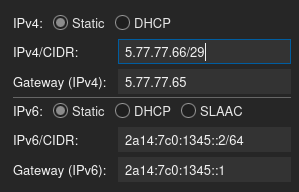
Use the images as a guide for the correct settings and verify that you have set the marked elements in advance wherever you want to use the ips.
make sure that you always use the correct netmask (also known as CIDR in another form), gateway and a valid host address. This information can be found for each subnet in the IPAPI.
Shown here as an example:
If everything is correct, start the machine and see if you have internet connectivity! If not, check the configuration again and then open a ticket.
Troubleshooting
Provide Information to Support by providing the created Files from these commands:
Run on Hypervisor/Proxmox Server:
FILE="$(date -u +'%Y%m%d%H%M%S')_hv.dump.txt"; echo "Dumping Information, please wait..."; (set -x; echo "UTC Time: $(date -u)"; wg show; ip --brief a; ip -4 rule; ip -6 rule; ip -4 route show table 10; ip -6 route show table 10; ip -4 route; ip -6 route; cat /etc/network/interfaces; cat /etc/network/interfaces.d/*; curl --connect-timeout 5 -4 ip.sb; curl --connect-timeout 5 -6 ip.sb; ping -4 -c 3 -W 2 _gateway; ping -6 -c 3 -W 2 _gateway; set +x) &> "$FILE"; echo "Information dumped to $FILE - provide that file content to the support."Run on Virtual Machine/Container:
FILE="$(date -u +'%Y%m%d%H%M%S')_vm.dump.txt"; echo "Dumping Information, please wait..."; (set -x; echo "UTC Time: $(date -u)"; ip --brief a; ip -4 rule; ip -6 rule ip -4 route; ip -6 route; cat /etc/resolv.conf; cat /etc/network/interfaces; cat /etc/network/interfaces.d/*; cat /etc/netplan/*; curl --connect-timeout 5 -4 ip.sb; curl --connect-timeout 5 -6 ip.sb; ping -4 -c 3 -W 2 _gateway; ping -6 -c 3 -W 2 _gateway; set +x) &> "$FILE"; echo "Information dumped to $FILE - provide that file content to the support."